Sovereign DNS security

Block the domain before the connection is made.

KoraxDNS resolves your organisation’s DNS in the EU and refuses the names that lead to malware, phishing and command-and-control — before a packet reaches them. Every refusal lands in the console with the reason it was made, and with the user behind it wherever identity mapping is in place.

  • Deploys by pointing your resolver — no appliance, no endpoint agent
  • Enforced in the EU, under EU legal jurisdiction
  • No agent on your domain controllers

The problem

Your resolver answers everything, and tells you nothing.

DNS is the one thing every device on your network uses before it does anything else. On most SME networks it is also the one thing nobody is watching.

  • The resolver on the firewall answers every name it is asked, including the one a phishing mail just planted.
  • A workstation talks to command-and-control for a week, and the first sign of it is somebody else’s incident report.
  • DNS logging is off, or on and rotated away before anyone needs it.
  • A blocklist exists somewhere, but nobody can say what it blocked yesterday or why.
  • The tools that would answer this are priced for organisations with a security team to run them.

And now NIS2 is asking what you did, when, and who did it.

How it works

Point your resolver at us. That is the deployment.

There is no appliance to rack and no agent to package. You change a DNS forwarder on the firewall, router or DHCP scope, and the next query is already being decided.

How a DNS query is decided Devices on your network send DNS to your firewall, router or DHCP scope, which forwards it to KoraxDNS in the EU cloud, either over plain DNS or over DNS-over-HTTPS with a token identifying your organisation. KoraxDNS checks the name against the KoraxDB threat-intelligence database and against your own policy, and returns either the answer or a refusal, together with the reason, which the console shows. Optionally, a KoraxLabs DDI appliance on your premises acts as the local resolver and keeps the long-term log archive, and Korax Connect keeps laptops on the same policy when they are away from the network. Your network Workstations, servers, guests everything that resolves a name Firewall · router · DHCP scope EU cloud · OVHcloud, EU regions KoraxDNS threat categories · your policy your allowlist wins Sees: the name, the time, a source identifier, the user. forwards the query · Do53 or DoH answer, or refusal with the reason Optional add-ons KoraxLabs DDI — local resolver, identity, long-term log archive Korax Connect — laptops keep the policy off-network
Enforcement runs in the sovereign cloud. Deploying it is a resolver change; the appliance is optional.
  1. Your network forwards its DNS

    Point the firewall, router or DHCP scope at KoraxDNS — over plain DNS, or over DNS-over-HTTPS with a token that identifies your organisation. Start with one subnet or a pilot network; nothing else has to change.

  2. We decide, in the EU

    Each name is checked against KoraxDB, our threat-intelligence database, and against your own policy: the categories you block, your allowlist, your blocklist. A risky name is refused before the connection is attempted.

  3. You see the decision and the reason

    The console shows the domain, the category, the action taken, the time, the policy and the source that triggered it — along with the network or user it came from. Not a counter: the event, with its evidence.

Guided onboarding with self-serve trial elements: you sign up, choose a policy, change one resolver, and we stay with you until you can see your own traffic. A new organisation starts in monitor mode: nothing is refused yet, every name that would have been blocked — by a threat detection or by its own blocklist and policies — is flagged, and it starts blocking when it chooses.

Production is hosted only with EU providers, currently OVHcloud, in EU regions, under EU legal jurisdiction.

What KoraxDNS does

The whole product, page by page.

Everything below is a screen in the console your trial opens on — not a roadmap and not a capability matrix.

What you get, and the thing that makes it true.
ValueWhy to believe it
Blocks by threat category Malware, phishing, command-and-control and botnet infrastructure, and abuse and spam sources — plus addresses with a bad reputation, whatever name points at them. You choose which categories apply.
Tells you why a name was blocked A threat-intelligence verdict carries its category, the source that supplied it, a confidence, and when the name was first and last seen — so a block can be argued with instead of guessed at. A name on your own blocklist is simply yours.
Blocks the address, not just the name The answer is inspected before it reaches the client: if a name resolves to an address already known for hosting criminal infrastructure, the reply is refused even though the name itself is unknown.
Takes your word over ours Your allowlist wins over any verdict and any block. Your blocklist adds names our sources have not seen yet.
Shows who asked, not just what Agentless Active Directory correlation ties a DNS event to the real user, the device and the subnet.
Keeps the record for the audit A searchable activity feed, monthly NIS2-style reports as PDF, and a tamper-evident audit trail of administrative actions.
Protects the networks you do not own Per-organisation DNS-over-HTTPS tokens, so a roaming laptop or a guest network resolves under your policy.
Runs sovereign Resolution and enforcement happen with EU providers in EU regions, under EU legal jurisdiction.

In the console

Dashboard
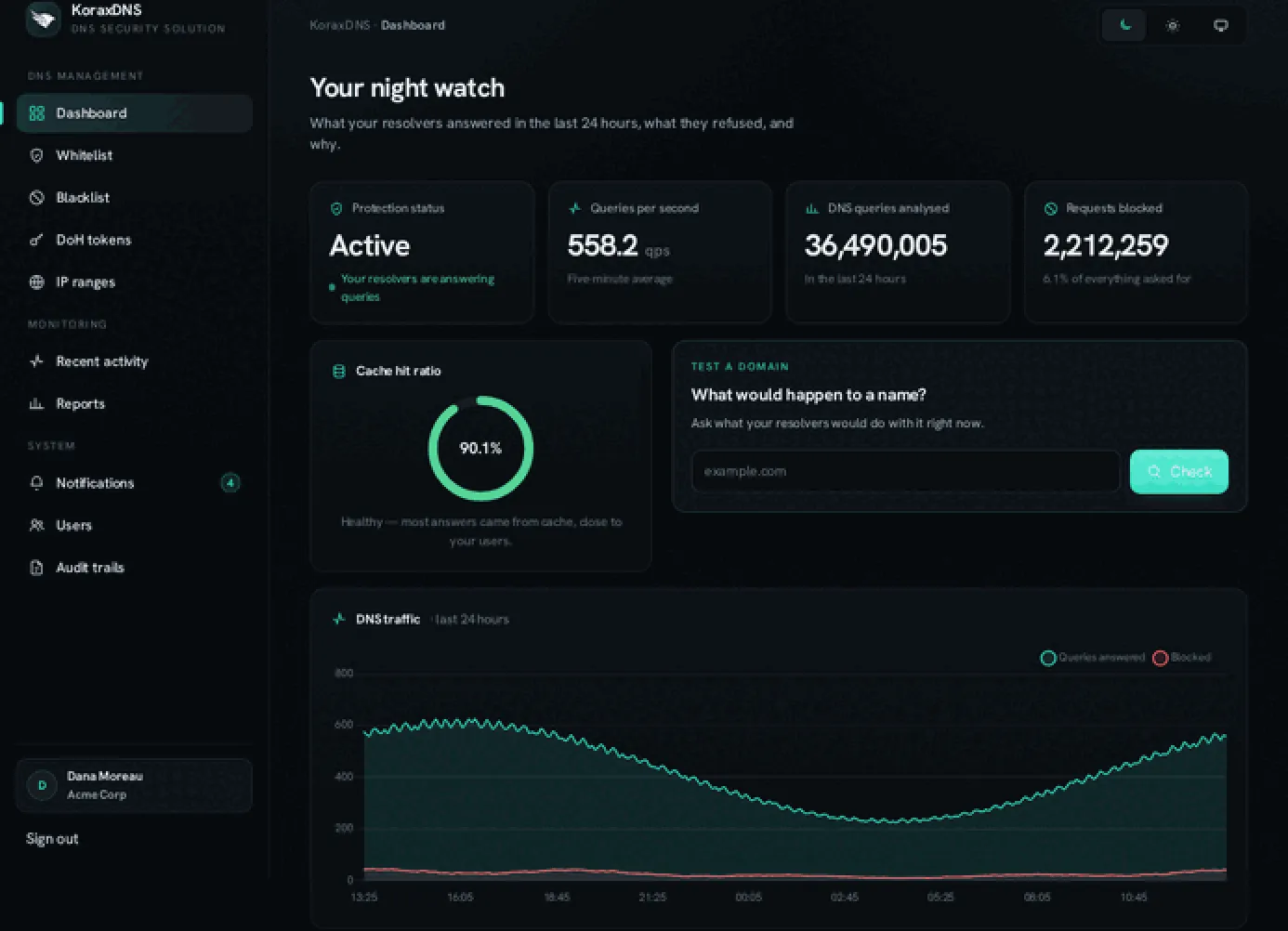
Protection status, what your resolvers answered and refused in the last 24 hours, the categories behind it, and a box to ask what would happen to any name right now.
Recent activity
Blocked events newest first — domain, category, which layer decided, the client, and a link to why.
Whitelist and blacklist
Your own allow and block entries, applied ahead of the threat feeds.
Policies
Opt-in categories, per organisation — advertising and trackers, newly registered domains (7 or 14 days) and content categories such as adult, gambling or piracy are switched on here, and are off until you do.
AI usage
Which AI applications your network reaches, by application and vendor, from DNS, with Block or Allow per application.
Reports
Monthly security and NIS2-style reporting, generated and mailed, downloadable as PDF.
DoH tokens
Per-organisation DNS-over-HTTPS endpoints for devices off the corporate network.
IP ranges
The source networks that identify your organisation to the resolver.
Users, notifications, audit trails
Colleagues with roles and step-up MFA, alert digests by mail, and a hash-chained record of who changed what.

What it is not: a DNS-layer product blocks a name before the connection is made. It does not inspect encrypted application content, and it does not replace endpoint detection, data-loss prevention or a SaaS security broker. It reduces exposure to known and suspected risky domains; no DNS filter can promise every unknown threat.

Threat intelligence

How a verdict is made.

A block is only as good as the reason behind it. KoraxDNS weighs every source by how much it has earned, acts on the strength of that evidence, and keeps an allowlist of the world’s busiest domains standing between a noisy feed and your business.

Where the evidence comes from

A national cybersecurity centre

An authenticated feed from a national cyber-security authority, pulled from its live threat-intelligence platform rather than a public export. The highest-trust input in the set, and the one that reflects what is being used against organisations in this region right now.

National CERT reporting

Phishing confirmed by a national computer emergency response team — names that a public body has already investigated and stands behind.

Commercial threat intelligence

Licensed feeds of malware domains and malware-hosting addresses, refreshed continuously. Paid for so that you do not have to negotiate, integrate and maintain them yourself.

Community and abuse reporting

Open, high-volume sources where malware command-and-control and phishing infrastructure is reported as it is found — the fastest signal, and the one that most needs corroborating.

Address reputation and criminal netblocks

Feeds of individual addresses with a history of abuse, and of whole network ranges that exist to host crime. These describe infrastructure rather than names, which is what makes them hard to evade by registering a new domain.

An allowlist of the world’s busiest domains

The most-visited names on the internet are carried as an explicit allow signal. It is there to stop a noisy feed taking your business offline — a false positive on a name everyone uses is far more expensive than a missed block.

How they are weighed

Every source carries a trust weight earned by what it is and how it has behaved. A sighting from a national authority counts for more than an anonymous community report, and the difference is a number in the engine rather than an opinion.

Evidence accumulates. A source that keeps listing a name across successive refreshes counts for more than one that saw it once, and a name carried by more than one source counts for more still. In practice most blocks rest on a single well-weighted source: a national CERT reporting a phishing domain is acted on without waiting for a second opinion.

Evidence ages. A sighting loses weight as it gets older and an expired listing falls out of the corpus entirely, so the corpus reflects what is dangerous now rather than what was dangerous once. Verdicts are recomputed continuously as that happens.

Blocking on the answer, not only the question

Most DNS filtering stops at the name. KoraxDNS also inspects the answer: the addresses in a reply are checked against the reputation corpus before that reply reaches the client.

An address scored to block turns the reply into NXDOMAIN. Addresses that the evidence only puts under watch stay in the corpus without refusing anything, so the reputation signal can build before it costs anyone a connection.

That matters because a name is cheap and infrastructure is not. An attacker can register a domain nobody has ever seen, but it still has to point somewhere — and the somewhere is usually a machine or a network that is already known.

Categories

Malware
Names that distribute malicious software or that infected machines are told to contact.
Phishing
Credential-harvesting and impersonation, including names confirmed by national reporting.
Command-and-control and botnets
The infrastructure an infected machine talks to once it is already inside.
Abuse and spam sources
Names and networks with a sustained history of abuse.
Bad address reputation
Addresses and whole netblocks with a history of hosting crime. Those scored to block are refused on the answer rather than the question; those only under watch are recorded.
Newly registered domains Opt-in per organisation
Names registered in the last 7 or 14 days — disproportionately used for phishing before any feed has caught up — for organisations that choose to block them at the DNS layer.
Advertising and trackers Opt-in per organisation
Advertising and tracking networks, for organisations that choose to block them at the DNS layer.
Content categories Opt-in per organisation
Whole categories of sites — adult content, gambling, VPNs and anonymising proxies, piracy, and 37 general content categories — for organisations that choose to block them, one category at a time. Each domain takes its category from our classifier; a domain it has not classified yet, or is unsure about, gets no category and is never blocked by one. A content category can be switched on once enough of your organisation's own traffic is categorised; the console shows how much is, and what that traffic consists of.

The first five are enforced from live intelligence today. Advertising and trackers is opt-in, and so is Newly registered domains, and so is each content category: each stays off until an organisation switches it on in the console, under Policies. Newly registered domains is offered with two windows, 7 or 14 days — one window per organisation at a time; the 14-day window includes the 7-day one. Whatever is switched on, your whitelist still wins.


AI service usage

Which AI services your network is actually using.

Staff reach AI services from work whether or not there is a policy about it. KoraxDNS shows you which ones, per organisation, from the DNS your network already sends us, by application and by vendor — and lets you block an AI application, such as ChatGPT or Copilot, with one action.

Usage is attributed to the application — ChatGPT, the OpenAI API, Microsoft Copilot, Gemini, Claude, Le Chat — and to the vendor behind it, from a curated, sourced catalogue that gives every hostname a confidence. A hostname we are not confident about is counted but never enforced, and a service reached through a shared apex is seen only through the hostnames that belong to it, so the answer is conservative by construction rather than inflated by a wildcard.

Blocking works per application, not per vendor: block ChatGPT, and chatgpt.com stops resolving for your whole organisation within seconds, while the OpenAI API and openai.com still answer — a block never covers the vendor’s other applications. Before you confirm, the console lists exactly the hostnames that will be refused, and every block asks you to confirm your identity again with a second factor. A hostname below our confidence threshold is observed, never enforced, and your allowlist still wins over any block.

What you see are counts of DNS queries after client caching, not a count of requests, and not a measure of how much anybody used a service.

The resolver sees names, never prompts or files. This is DNS-observed service usage, by application, with optional blocking per AI application — it is not content inspection, and it is not data-loss prevention.

AI usage · your organisation Available
  • ChatGPT · OpenAI chatgpt.com Blocked
  • OpenAI API · OpenAI api.openai.com Observed
  • Claude · Anthropic claude.ai Allowed
  • Gemini · Google gemini.google.com Observed
  • Microsoft Copilot · Microsoft copilot.microsoft.com Observed

Illustration. Observed from DNS, by application; Block or Allow applies to one application, and your allowlist still wins. Counts are DNS queries after client caching, not requests.

Identity-aware, agentless

Who asked, not just what.

An IP address is not an answer. It is the beginning of an investigation you do not have time for.

KoraxDNS correlates Active Directory sign-in events with the addresses on your network, so a DNS event carries the user, the device and the subnet it came from — not just a resolver log line.

That correlation is read through MS-EVEN6, the same native Windows event interface Event Viewer uses. No agent is installed on a domain controller, no WinRM, no PowerShell remoting, nothing for your EDR to quarantine and nothing to re-approve at the next change board.

Identity travels with the query, so a block decision and the report that follows name a person rather than an address.

Where no identity mapping exists, an event still carries its network and site — network DNS alone cannot always name the individual user.

The KoraxDNS console dashboard, showing protection status, queries per second, blocked requests, cache hit ratio and a 24-hour DNS traffic chart.
KoraxDNS console — demo data. The DDI appliance and Ask Kora screens come from the DDI team.

NIS2 and sovereignty

Answer the audit with records, not recollections.

NIS2 asks organisations that never had a compliance programme to show what happened on their network and who did it. That is a logging and retention problem before it is a policy problem.

Tamper-evident audit

Administrative actions are written to a hash-chained audit trail, so a gap or an edit is visible rather than silent.

Retention you can answer for

DNS-security events are kept and searchable for the window your plan sets, and the monthly report is generated from them rather than assembled by hand.

Reporting and export

Built-in monthly reports for the questions auditors actually ask, as PDF, mailed to the people who need them.

Data residency you can point at

Production is hosted only with EU providers, currently OVHcloud, in EU regions, under EU legal jurisdiction.

To be exact about what goes where: resolving a name means we receive the name, the time and a source identifier, and the user where identity mapping is enabled — that is what a resolver decision is made of. Web page content, HTTP payloads and files are never inspected, because a DNS-layer product does not see them.

The rest of the suite

Add-ons, when DNS security is not the whole answer.

KoraxDNS stands on its own. These extend it — onto your own hardware, onto laptops that leave the building, and into plain-language questions about your own network.

DNS-security enforcement runs in our sovereign cloud; the appliance is your local resolver, identity layer, and long-term log archive.

KoraxLabs DDI

Available

The on-prem appliance

DNS, DHCP and IP address management on your own hardware, with identity correlation, an HA pair, network discovery and a tamper-evident audit trail. It forwards to KoraxDNS for enforcement and keeps your records — and your long-term log archive — on your own box.

Korax Connect

Available

The roaming agent

Keeps Windows laptops on your DNS policy away from the office, and hands DNS back to the local resolver the moment they return to the corporate network.

Ask Kora

Available

On-box AI, on the appliance

Ask your network a question in plain language and get the answer from the appliance itself, grounded in your own DNS, DHCP and IPAM history.

Ask Kora · on the appliance Available
YouWhich users hit blocked domains last week?
KoraFourteen users across three sites. The largest share is one marketing workstation with repeated requests to a newly registered domain, blocked each time. Here is the list, by user, with the domains and the times.
YouWhich subnets are close to running out of addresses?
KoraTwo: the Antwerp guest network and the Ghent voice VLAN. Both have been climbing since the start of the month. Here is the trend and the next free range in each.

Ask Kora runs on the appliance. Your questions and the data behind the answers stay on the box; nothing is sent to an external AI service.

Pricing

Priced for the organisation, not the seat.

KoraxDNS is sized by the networks you protect. The add-ons are quoted on top, when you want them. Tell us the shape of yours and we will quote it — the capability split is below.

Starter

One network, one policy. DNS security you can turn on this week.

  • Threat categories and verdict detail
  • Your allowlist and blocklist
  • Activity feed
  • Monthly report
  • DoH tokens

Contact us for a quote.

Pro

Several sites, identity on your DNS events, and the compliance pack.

  • Everything in Starter
  • Multi-site
  • Agentless AD identity correlation
  • AI service usage by application, with per-application blocking
  • SSO
  • The NIS2 reporting pack

Contact us for a quote.

Managed

We run it for you, or your MSP does. Hands off.

  • Everything in Pro
  • Managed policy and review
  • Multi-tenant administration for MSPs
  • Reports prepared for you

Contact us for a quote.

Proof

The things a security team asks about first.

None of these are new commitments made for a web page — they are how the product is built.

EU hosting and residency

Production runs only with EU providers, currently OVHcloud, in EU regions, under EU legal jurisdiction.

GDPR and DPA

A data-processing agreement, and a clear record of which data a resolver decision needs and which data we never see.

Agentless, EDR-friendly

Nothing is installed on a domain controller, so there is nothing for an endpoint agent to flag and nothing to exempt.

An alternative you can run

The capabilities Infoblox and EfficientIP charge enterprise money for, at a price and a complexity an SME can actually carry.

Next step

See your own DNS traffic.

The trial takes a resolver change and shows you what your network has been asking for. The appliance conversation can follow, or not at all.